
The Kafka desktop app that does the whole job.
Deep investigation without the toolchain sprawl. Stream, replay, tag, filter, inspect, reconstruct, test and manage Kafka data — in one workspace that keeps your context while you move.
One timeline for the whole workflow
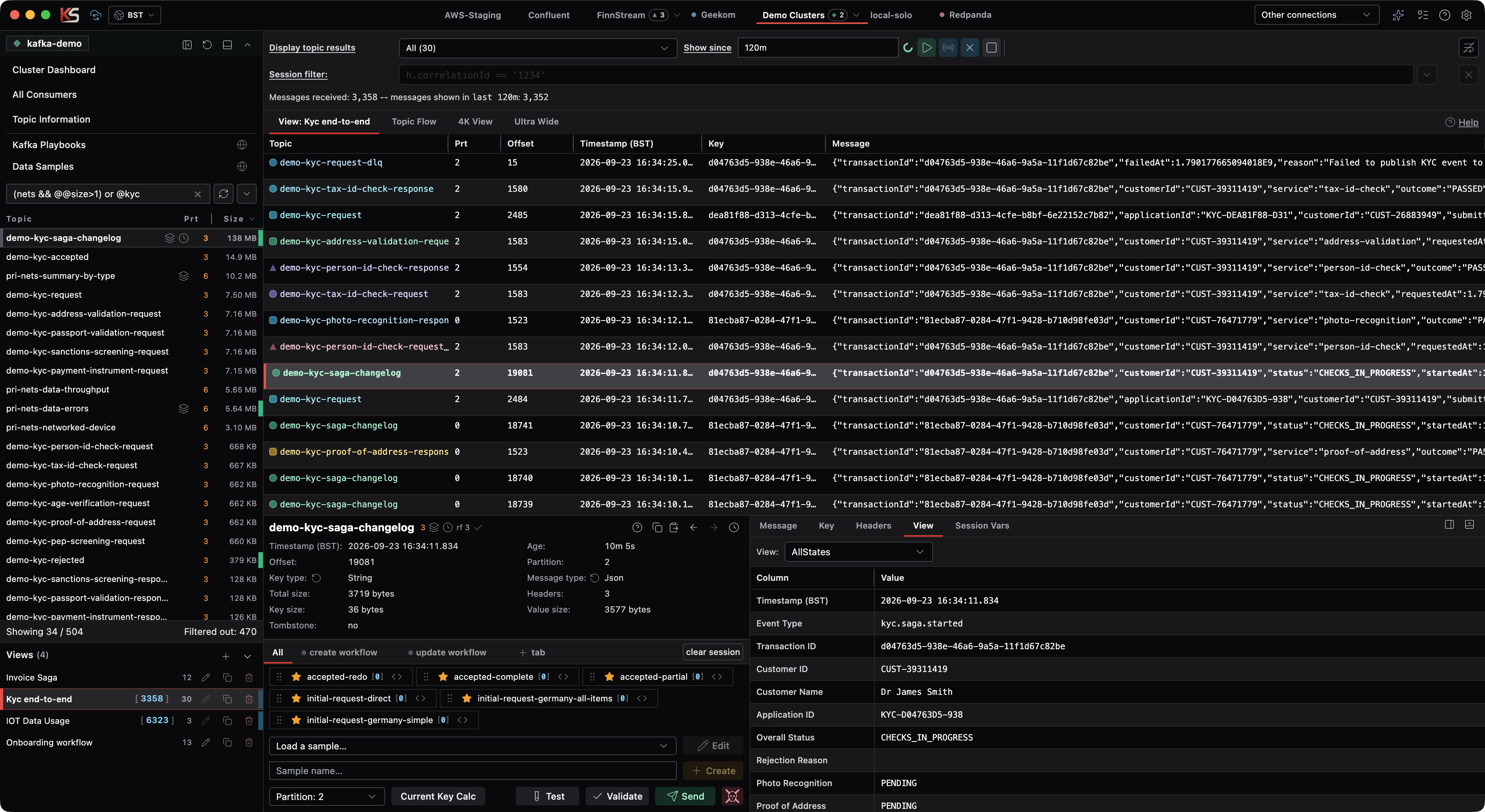
Combine up to 30 topics into a single chronological live timeline — or replay an exact historical window for incident forensics. Per-topic filters, a temporary session filter, and an activity-aware flow chart show the journey through the wider process.
- Tables, custom views and flow charts
- Playback data persisted across restarts
- Turn any playback into a live tail in one click
Everything around the message, not just a topic browser
The capabilities other tools ship as separate scripts, exports and apps — built into one desktop workspace.
Streamyard Language + AI assist
Powerful filters for JSON, XML, keys, headers and metadata — with schema-aware autocomplete that learns your payload shape, and AI assist that writes the filter for you.
Samples & replay
Reusable message samples with @@ template tokens, session variables and business-data generators. Play them back in quantity, with delays, straight into topics.
Playbooks
Line-based scripts for setup, reset, copy and import workflows — with validation, dry-run preview and a wizard. Refresh a test environment to a known state in seconds.
Persisted playback
Investigation context stays put across reconnects and restarts. Pop out windows on the same connection and keep your working set exactly where you left it.
Topic & cluster operations
Copy topic data between clusters, repartition with explicit replica placement, empty topics, edit configs — plus consumer groups, ACLs, Connect and Schema Registry views.
Cloud Sync + Upcoming Multi-User Web Edition
Sync filters, views, playbooks, samples and Live Views across machines today — and coming soon, deploy Multi-User Kafka Streamyard as a microservice web app so your whole team can share connections, test-data samples, filters and Live Views in the browser.
Kafka Streamyard vs the alternatives
Where the depth difference shows up in daily work. Competitor columns reflect typical defaults — check current vendor docs for the latest.
| Capability | Kafka StreamyardFinnstream | Kafbat UIopen source web UI | Conduktorcommercial suite | Offset Explorerfree desktop |
|---|---|---|---|---|
| Multi-topic live timelineone chronological view across topics | Up to 30 topics + flow chart | Per-topic browsing | Per-topic; monitoring views | Per-topic browsing |
| Filtering | SL filters, autocomplete, AI assist — JSON & XML | CEL expressions | Field/search filters | Basic key/text filters |
| Test-data samples & replaytemplates, variables, generators, loaders | Full sample workspace + loaders | Produce only | Produce / faker-style options | Produce only |
| Playbook automationrepeatable environment scripts | Playbooks with dry-run & wizard | External scripts/IaC | External scripts/IaC | — |
| Persisted investigationscontext survives restarts & reconnects | Playback + working set retained | Session-scoped pages | Saved views / cloud workspaces | Session-scoped |
| Copy topic data between clusters | Background copy/paste tasks | Not built in | Gateway/migration tooling | Not built in |
| Workspace cloud sync | Filters, views, samples, playbooks | — | Cloud console accounts | — |
| Admin surfaceconsumers, ACLs, Connect, Schema Registry | Built in | Built in | Built in | Consumers; limited admin |
| Multi-user web deploymentshared connections, samples, filters & Live Views | Desktop now · Multi-user microservice web edition on its way | Web app + RBAC options | Web/console options | Desktop |
Comparison reflects each product's typical/default offering as commonly documented; features change over time. Kafka Streamyard is available today as a desktop app, with the multi-user microservice web edition on its way for teams that want to share connections, test-data samples, filters, and Live Views in a browser.
Start with the whole picture.
Download for Windows, macOS or Linux — and bring investigation, testing and topic operations into one workspace.